Create a Thank-You Page

Create a thank-you page to show your survey respondents after they submit their responses. This can consist of one or multiple text elements. In the example below we will combine the thank-you page with conditional text elements based on the respondent’s total score from multiple choice scoring. This feature is available on our Business and Enterprise account plans.
Continue reading this post…Multiple Choice Weights & Scores

By adding weights to multiple choice question options, you can very easily create scored surveys, quizzes or polls. For example, in question one the first option can be worth two points, the second option worth one point and the other options worth nothing. Or ask your quiz participants a simple yes/no question. “Yes” is worth 1 point and “No” worth 0 points. This feature is available on all paid account.
Continue reading this post…Custom Variables For Web Link Distributors

Custom variables are used in web link distributors to create unique links that can help you track each respondent or group of respondents. The variables can be viewed in reports and in data exports. For example, let’s say you’ve created an NPS survey to send to your company employees to gather feedback on how the company is doing. If you want to group the responses by employee category (marketing, sales, manufacturing, leadership), there are 3 ways you could do this.
Continue reading this post…WYSIWYG Text Editor for Questions

Since the beginning of SurveyRock, we have had the special Text element for when you just wanted to use images or text to give your survey takers some additional information. Earlier this year we expanded that WYSIWYG (what you see is what you get) capability to all of our question types as well. Now when you create a new survey question, the question title field text editor looks like this.
Continue reading this post…RTL (right-to-left) Language Support

In the English language we write (and read) from left-to-right but there are several languages, such as Arabic, Hebrew, Persian and Urdu that are written in the opposite direction, from right-to-left (or RTL). In addition to the approximately 300 million native speakers of Arabic (295 million) and Hebrew (5 million), there are ten major languages based on the Arabic alphabet, spoken by another 300 million people. In order to support them all, SurveyRock offers the ability to create surveys in RTL languages.
Continue reading this post…Customizing Your Survey
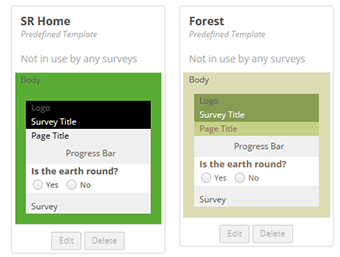
Customizing your survey is a great way to get respondents more familiar with your organization’s logo, to increase your survey response rate, and to stand out from the crowd.
Continue reading this post…Online Surveys As Part Of Your Event Marketing Strategy

Marketers are always trying to squeeze just a little more value out of each event and yet there’s one event marketing strategy that is often overlooked: online surveys.
Continue reading this post…Analyzing Survey Data: How Does It Play In Peoria?
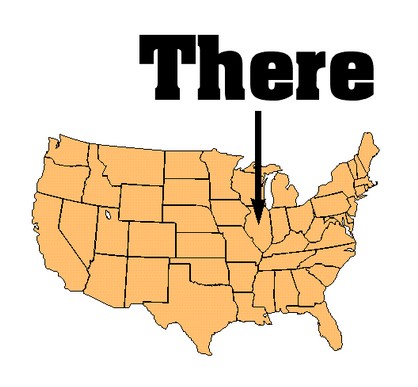
The saying “Will it play in Peoria?” originated in the early ’20s and ’30s during the US vaudeville era and is used to ask whether a given product, person, promotional theme, or event will appeal to mainstream America, or across a broad range of demographic/psychographic groups. The success of this resilient phrase can be attributed to the fact that the population of Peoria was fairly representative of the country as a whole.
Continue reading this post…Differences Between Male And Female Survey Respondents

Experts have discovered that there are actually differences in the way women’s and men’s brains are structured and in the way they react to events and stimuli. A study from the San José State University highlights how gender influences online survey participation:
Continue reading this post… English
  Shqip
Shqip  العربية
  Bosanski
  Български
  Hrvatski
  Čeština
  Dansk
Dansk  Nederlands
  Français
  Deutsch
  हिन्दी
  Magyar
  Italiano
  日本語
日本語  Latviešu valoda
  Lietuvių kalba
  Македонски јазик
  Polski
  Português
  Português do Brasil
  Română
  Русский
  Español
  Svenska
  Türkçe
  Українська